
Shopify SEO differs from working on a self-hosted shop because the platform provides a large part of the technology. According to SEO overview from Shopify the system generates sitemap.xml and robots.txt Automatically, it sets a canonical tag on each page, enables SSL, and provides schema markup for products in the themes. What you control yourself are titles, meta descriptions, URL handles, alt texts, redirects, and the structure of the navigation. At these points, it determines whether a Shopify store ranks higher in search than a competitor with a similar assortment. In practice, four issues most often determine visibility: duplicate product URLs, filter pages, app load, and settings for international markets.
What Shopify SEO does by default
The basics are there without your help. Shopify keeps the content according to the Information about the page structure in a logical category hierarchy, it omits iframes and uses simple, readable URLs. Each product, collection, and blog page gets a title tag with the shop name, unless you enter something else. That Canonical Tag is set automatically, and the XML Sitemap It updates itself automatically with each new product. Hosting, CDN, and compression are handled by the platform. Therefore, external testing tools for server configuration recommendations usually have no effect on Shopify.
The obligations on your part are manageable, but require some routine. The field for the page title takes up up to 70 characters, and Shopify recommends using a title that is no longer than 100 characters. Instructions on keywords maximum 60, so that Google doesn't truncate the title. The help mentions 160 characters for the meta description. Image files can no longer be renamed after uploading; therefore, a spoken filename must be provided before uploading. And anyone who removes a product from the catalog sets the forwarding under "Contents," "Menus," and "URL Forwarding" themselves. According to Help with URL redirects up to 100,000 redirects per shop are possible, with fixed paths such as /products and /collections they cannot be redirected in this case.
Keep double product URLs and filter pages under control
The most famous Shopify feature is the double product address. One product is listed under /products/handle, But also, from a collection, under /collections/name/products/handle. The liquid filter within it generates according to Shopify developer documentation Exactly this collection URL, and the documentation itself warns that both addresses display the same content on separate URLs. That is Duplicate content in small print. The canonical tag does point to the short product URL, and Google interprets it as Google Search Central As a strong signal. However, Google’s recommendation is still to always link to the canonical URL within your own website. Therefore, check whether your theme links products from collections with or without a collection path, and remove collection paths from the product tiles if necessary.
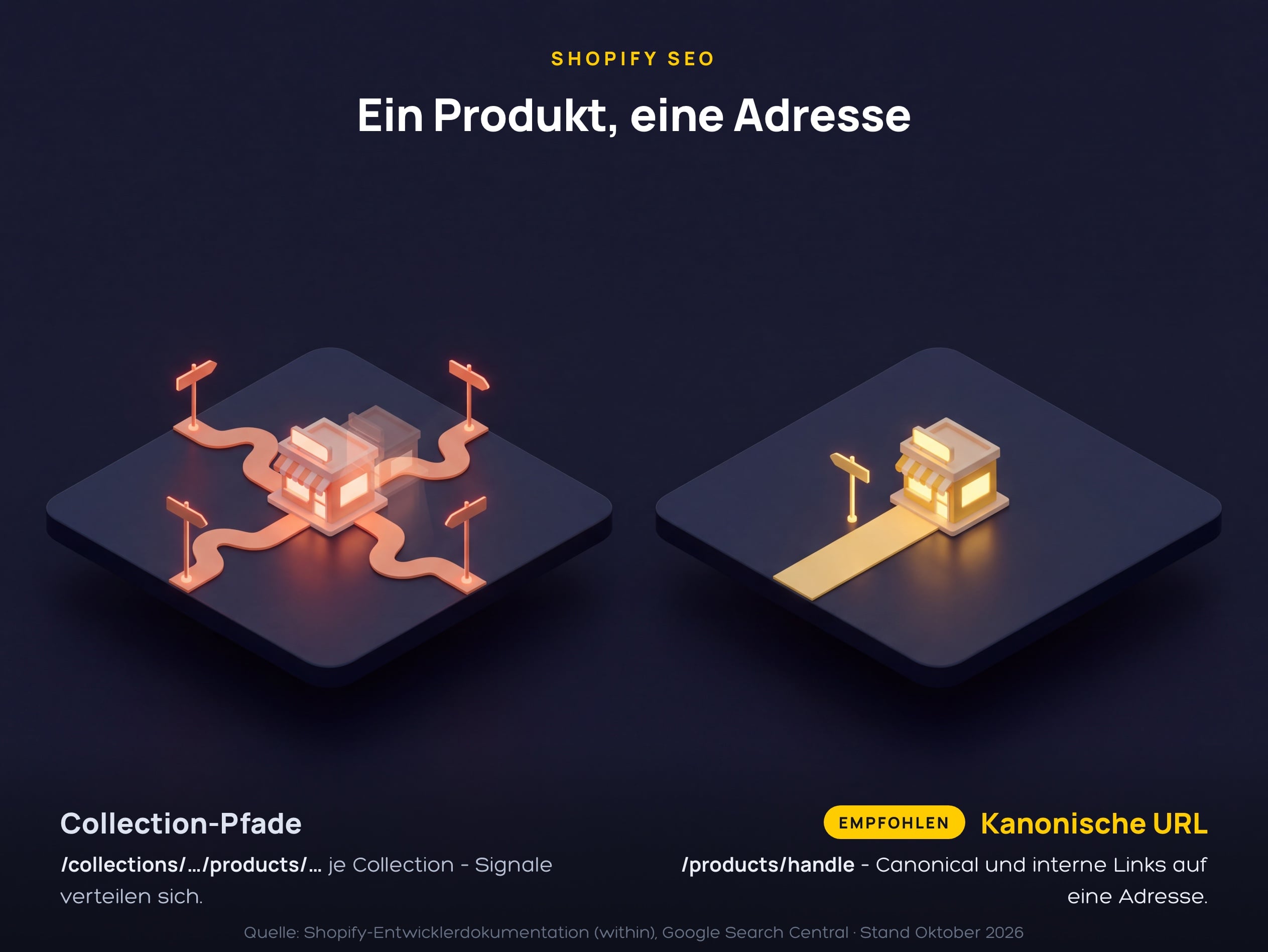
The diagram shows the problem and the solution side by side. On the left, several paths lead to the same product from different collections, each with its own address, and the signals are distributed. On the right, there is exactly one path to the short product URL, on which the canonical tag and internal links are displayed together.
Filter and sort pages are the second topic. The default file robots.txt According to Shopify, the Help on robots.txt.liquid already filtered collections (/collections/*+*) and sorted views (/collections/*sort_by*) for the Crawling. Google explains in the Information about faceted navigation, That filter URLs otherwise generate an almost infinite number of addresses and tie up crawl capacity. Blocking them via robots.txt is the first recommendation there; the canonical tag is considered a weaker signal. If you want to extend the file, add the template robots.txt.liquid In the theme, Shopify classifies this as an unsupported customization and warns that a bug could cost you all your traffic. You should handle individual pages more cleanly using the meta field. seo.hidden from the Sitemap and Index, as shown in Instructions for hiding pages describes.
Why apps and themes decide on loading time
Shopify evaluates the performance of your store according to the Report on web performance with the Core Web Vitals from real user data from the last 30 days. Each measurement value receives the classification „Good“, „Average“ or „Bad“, based on 75 % of the user experiences. The data runs for up to 36 hours and goes back 90 days. The Help with charging time Lists the following as the biggest influencing factors: the theme, installed apps, and manually inserted code such as the Tag Manager. One point is often overlooked: uninstalling an app does not automatically remove its code from the theme. The most effective measures according to Shopify:
- Keeping the theme current: Use a current theme like Horizon or an online store 2.0 theme from Shopify and use animations and page transitions sparingly.
- Check apps regularly: balance each app against its benefits, remove unnecessary ones, and have the remaining app code removed from the theme.
- Cleaning up tags: review the day manager for unused or low-value tags.
- Deliver images that are appropriate: Cut images to fit the display size, use JPG for photos and PNG only with transparency, don't overload page templates with sections.
- Large collections to page through: activate page-splitting for many products instead of loading everything on one page.
International markets and AI agents are being prepared
According to Shopify Markets, for stores with multiple countries, Help with international SEO the technical basics: hreflang tags on every page, a self-referencing canonical tag for each market version, and sitemaps with all market URLs. Search engine crawlers are exempt from the location-based redirection so that they can index every version. In terms of structure, Shopify recommends subfolders like /fr/, Because they share the authority of the main domain. Subdomains are treated by some search engines as separate websites; country domains provide the strongest local signal with the highest level of maintenance. In parallel, the importance of AI purchasing agents is growing, which we discuss in the article on Agentic Commerce described in the Shopify documentation. Shopify recommends in the Guide to optimizing for AI, Writing product pages for both humans and AI systems simultaneously. The general principles from our guide SEO for online shops This also applies in the case of Shopify. Specifically, this means:
- Fully maintain product data: incorporate technical specifications, material information, size charts, and comparison information into the product page, and supplement with structured data and product attributes.
- Set up the Knowledge-Base app: The free Shopify app shows which FAQs AI agents use about your shop and allows you to save your own answers.
- Actively setting crawler rules: According to Shopify, blocking AI crawlers in robots.txt does not prevent the Shopify Catalog from delivering product data to activated agent storefronts.
- Separating markets cleanly: Each market has its own domain, subdomain, or subfolder; otherwise, Shopify does not generate hreflang tags for that market.
- Consolidation of implementation: Theme customizations, robots.txt.liquid, and market setup should all be handled in one place, with the option to switch between them if necessary. Shopify agency Düsseldorf.
FAQs about Shopify SEO
Is Shopify good for SEO?
Yes, if you know the areas that Shopify doesn’t handle for you. The platform automatically provides the sitemap, canonical tags, robots.txt, SSL, and product schema. Titles, meta descriptions, alt texts, redirects, the link to the canonical product URL, and app load control remain your responsibility.
Why does a Shopify product have two URLs?
Because Shopify displays a product from a collection under /collections/name/products/handle can deliver, in addition to the short address /products/handle. The liquid filter within generates this Collection URL. The canonical tag points to the short URL. Google recommends that you still link internally only to the canonical address.
Can I change the URL structure with /collections/ and /products/ in Shopify?
No. The paths /products, /collections and /collections/all According to Shopify, these are fixed paths that cannot be removed or redirected. You can only customize the handle at the end of the URL. Fixed paths are not problematic for ranking as long as the handles are meaningful.
Do I need an SEO app for Shopify?
No, not necessarily. The platform itself provides the technical foundations for Shopify SEO, and any additional apps add to the loading time. An app is worth it if it fills a specific gap, for example when mass editing alt text or checking for broken links. Weigh the benefits of each app against its impact on Core Web Vitals.
How can I improve the loading time of my Shopify store?
With a current theme, fewer apps, and images tailored specifically for the site. Shopify lists theme, installed apps, and manually inserted code as the biggest influencing factors. After uninstalling an app, its code often remains in the theme and must be removed manually. The progress is shown in the web performance report in the Shopify admin with real user data.