
A Headless CMS Manages your content and delivers it to any surface via an interface without having to create a website yourself. This is worthwhile if the same content is being displayed on multiple channels or if your front-end system has requirements that slow down a classic system. For the typical corporate website with an editorial team without its own developers, the classic system is usually the more affordable option. How often this question is asked is shown by the Usage statistics from W3TechsWordPress powers 40.2% of % all websites and 58.7% % of websites with a known CMS (as of September 28, 2026).
This is how a headless CMS works
A classic CMS (Content Management System) It performs two tasks in a system. It stores text, images, and page structure, and it generates the finished HTML pages from it using themes and templates. With the headless approach, the second part, the proverbial “head” is omitted. The CMS only presents the content as structured data and delivers it via a API out, mostly as JSON via REST or GraphQL, and the representation is handled by a Front end, Developers, for example, build with Next.js, Nuxt, or Astro.
For that, you don't necessarily need a new system. WordPress includes a REST API as a core feature, and that WordPress guide to the REST API specifically mentions the case of pulling WordPress content into completely separate applications. In addition, there are systems that are built from the outset as headless ones: hosted services like Storyblok or Contentful, and open-source solutions like Strapi, which can be used either on its own or as a cloud service. The systems differ primarily in their editorial interface and operation. The principle is the same for all of them: the content is stored in a shared pool, and the output is generated elsewhere.
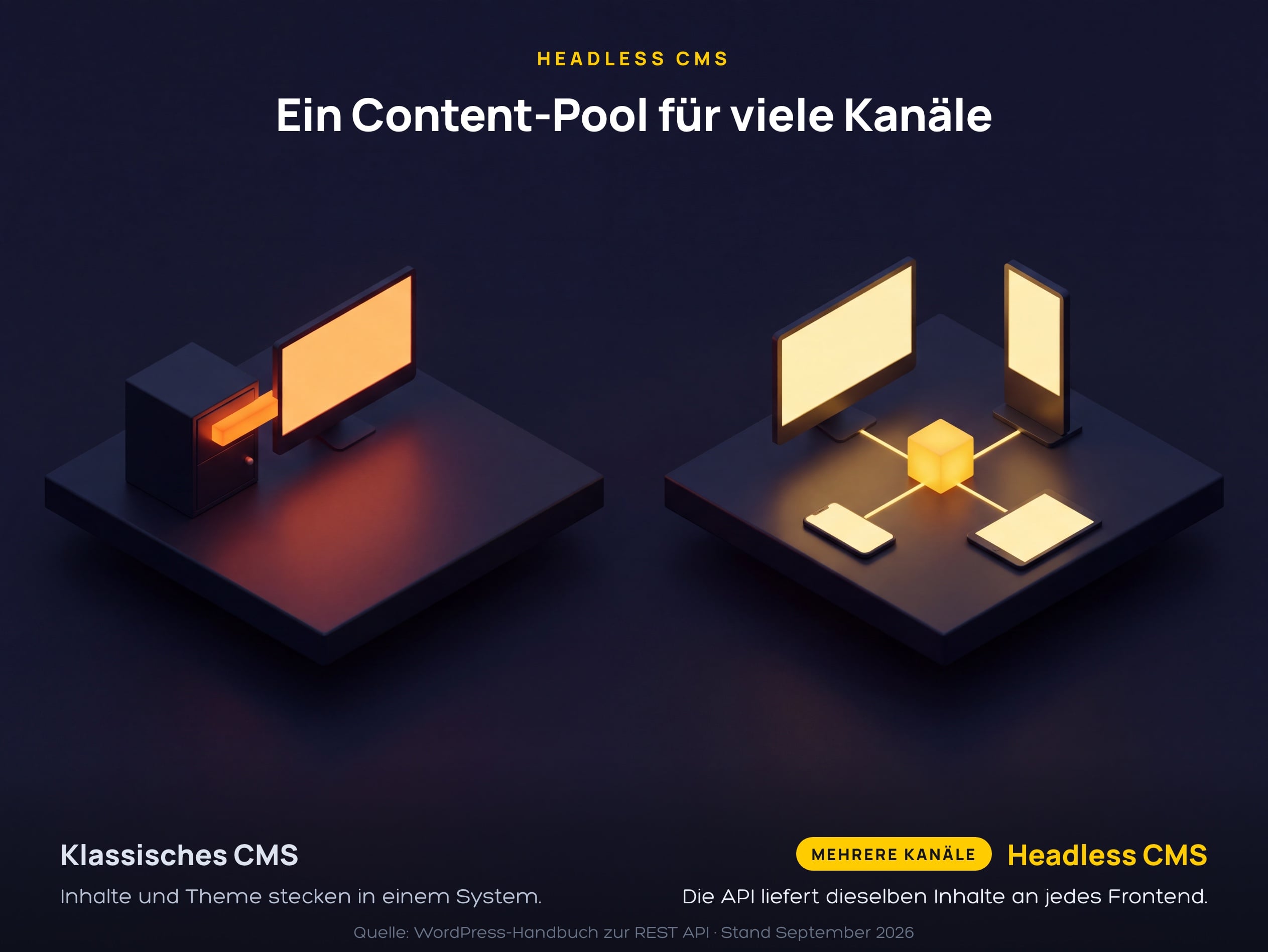
The diagram shows the difference in structure. On the left, content and presentation are tightly connected and serve a single website. On the right, a content pool uses the API to provide multiple output channels simultaneously, such as the website, smartphone app, tablet, and a display in the store.
What Headless means for SEO and Editorial
For search engines, what is in the delivered HTML matters. Google processes JavaScript pages in three steps, namely crawling, rendering, and indexing, and according to Google's guide to JavaScript SEO A page can spend varying amounts of time in the render queue. If your front-end builds the content in the browser first, you risk delays in indexing, and not every bot will support it. JavaScript Google therefore recommends server-side rendering or pre-rendering and refers to the previously widespread dynamic rendering in its Documentation on dynamic rendering as a temporary solution.
The second construction site is the editorial team. In the classic WordPress, your team can see what a post will look like by clicking on „Preview“. In the headless setup, this preview has to be programmed specifically; Next.js, for example, provides a Draft Mode for unpublished CMS content ready to handle the intermediate pages for editors. Also meta titles, canonical tags, XML sitemaps, and Structured data are created in the front-end code. What a SEO plugin does in the classic system via a form field is thus turned into a task for development. Plan for this in advance, because a lack of preview slows down the editorial team for every single post.
When a headless CMS is worth it
The extra cost makes sense if at least one of the following points applies to your project. If none of them apply, you are paying for flexibility that you are not using, and for a second system that needs to be maintained. In addition to the CMS tariff, which is approximately Price overview of Storyblok After users, API calls, and data volume, you pay for the development and hosting of your own front-end. A corporate website with 20 pages and an editorial team without developers usually does not meet the criteria. Review the list with the editorial team and development team together, because both parties bear the consequences of the decision:
- The same content runs on multiple channels, such as the website, app, customer portal, or the screens in the store.
- Several websites or country versions are to be fed from a common content pool.
- The front end needs features that a theme only implements with great effort, for example a highly interactive product configurator.
- An in-house development team or agency is responsible for the continuous development of the frontend, preview, and hosting.
- Your security requirements indicate that the editorial system should be separated from the public web and only deliver finished pages.
This is how you plan the switch without losing ranking
A switch to headless is technically a Relaunch, Even if the texts remain the same, the HTML, loading times, and often the URLs change, and it is precisely at these points that rankings are lost during go-live. These points should be included on the checklist before going live:
- Define the rendering strategy: server-side or statically rendered, so that each page can deliver its full content without JavaScript
- Capture all previous URLs and redirect them to the new addresses via a 301 redirect if the structure changes
- Meta title, Meta description, Canonical tags, hreflang and rebuild the sitemap in the frontend and match it to the old page
- Set up the preview for the editorial team before the first post is created in the new system
- Plan ongoing costs for front-end hosting, CMS rates, and the maintenance of both systems within the budget
Anyone who stays with WordPress saves themselves the system change and can still go headless later, because the REST API is already built into the core. The preview, SEO plugin, and forms will then remain intact, without anyone having to re-program them. What is crucial then is the ongoing maintenance that we cover in the post. WordPress security We will discuss whether your project works better in a classic or headless way. WordPress Agency Düsseldorf about your specific project.
FAQs about Headless CMS
What is a headless CMS?
A content management system without its own presentation layer. It stores content as structured data and delivers it via an API, usually via REST or GraphQL. The appearance of the content is determined by a separately developed front-end. Classic systems like WordPress in the standard installation, on the other hand, deliver content and finished pages from a single source.
Can WordPress serve as a headless CMS?
Yes. WordPress comes with a REST API that allows you to access posts, pages, and media. You then build the frontend separately, using Next.js for example. Plugins that integrate their output through the theme do not affect the delivered pages in this structure. For forms, search functionality, or SEO metadata, you need to implement your own solutions in the frontend.
Is a headless CMS bad for SEO?
No, if the front end renders the pages server-side or statically. Problems arise when content is loaded in the browser via JavaScript first, because Google only fully sees such pages after rendering. In this setup, the front end renders the meta data and structured data. To check whether Google has fully captured a page, use the URL checker in the Search Console.
What headless CMSes are available as open source?
Strapi is a popular open-source solution that you can host yourself or use as a cloud service. WordPress is also open source and can be operated headless via its REST API. With open source, you don’t pay a license fee, but you have to handle hosting, updates, and security yourself. Which solution is best depends primarily on who takes care of the system after launch.
How much does a headless CMS cost?
The software is available for as little as €0, either as open source or in the free Starter plan from Storyblok. The Growth plan from Storyblok costs $99 per month according to the pricing page (as of September 28, 2026). In addition, development and operation of the own front-end are included, which vary depending on the project and are charged separately.